Your Family’s Digital Diet

Make space for
what makes
a childhood.

Protect the everyday experiences children need. Protect them from online hazards they should not have to manage alone. Clear boundaries at home. Safer environments built by companies, governments and communities.

One plate for a whole childhoodFive sections with ink illustrations of relationships, play, learning, movement and rest. Sections meet at the open centre; their sizes are illustrative rather than measured daily portions.RelationshipsPlayLearningMovementRest
Five everyday needs. Different ways to meet them at each age.The sections are a reminder, not a recommended division of the day.
Childhood comes first

Make room for relationships, play, learning, movement and rest.

Context matters alongside time

Consider your child’s age, the content, the design, the timing and the support around them.

Parents should not carry this alone

Children deserve protection from harmful contact, content and manipulative design. Governments, companies and communities must step up.

01 / Start with everyday experiences

What belongs in your
child’s daily diet?

Children need a varied daily diet of experiences. The ingredients stay broadly the same as they grow, but what those experiences look like changes.

Think of one plate holding the experiences that make up a child’s day. These five ingredients give you a practical place to start.

Relationships

For a baby
Responsive care, cuddles and talking.
For a toddler
Comfort, shared attention and help with big feelings.
For a kinder-aged child
Playing together, family routines and help making friends.
For a primary school child
Time to talk, friendships and trusted adults who listen.
For a teenager
Trusted adults, friendships and growing independence.
Play

For a baby
Sensory exploration and simple games.
For a toddler
Pretend play, blocks and exploring safely.
For a kinder-aged child
Imaginative play, making things and games with others.
For a primary school child
Free play, creative projects and games with friends.
For a teenager
Hobbies, creativity and recreation.

Learning

For a baby
Songs, books and exploring objects.
For a toddler
Naming things, sharing books and trying everyday tasks.
For a kinder-aged child
Stories, questions, counting and hands-on discovery.
For a primary school child
Reading, school learning and exploring interests.
For a teenager
Reading, study and developing interests.

Movement

For a baby
Supervised floor play and opportunities to reach, roll and move.
For a toddler
Walking, climbing and active outdoor play.
For a kinder-aged child
Running, jumping, dancing and practising coordination.
For a primary school child
Active play, riding, walking and sport they enjoy.
For a teenager
Sport, walking and outdoor activity.

Rest

For a baby
Sleep, comfort and predictable routines.
For a toddler
Sleep, a calm bedtime routine and quiet breaks.
For a kinder-aged child
Sleep, familiar bedtime routines and downtime after busy days.
For a primary school child
Regular sleep, time to unwind and space between commitments.
For a teenager
Sleep, downtime and space to unwind.
Then ask about technology

What is this adding to your child’s life? What is it taking the place of?

Start with the need your child is trying to meet. Then consider what this activity adds and what needs room alongside it.

What does it add?

A video call with a grandparent can create a moment of connection. Making music or following a drawing tutorial together can give a child a way to create.

What might it crowd out?

A feed that keeps going at bedtime can take time away from sleep. Gaming through the whole afternoon can leave less room to move, play or spend time with other people.

Consider the activity, its timing and your child’s needs as well as the device.

See what this looks like at your child’s stage ↗

The plate is a reminder, not a timetable. Children need a variety of everyday experiences. What those experiences look like changes with age, ability and family circumstances.

02 / Grow the conversation

Different stages. The same whole child.

Explore what is developing, what your child needs from you and what to consider about technology. Each stage is a starting point, with room for individual differences.

From understanding to everyday action

Five ways to shape
family life with technology

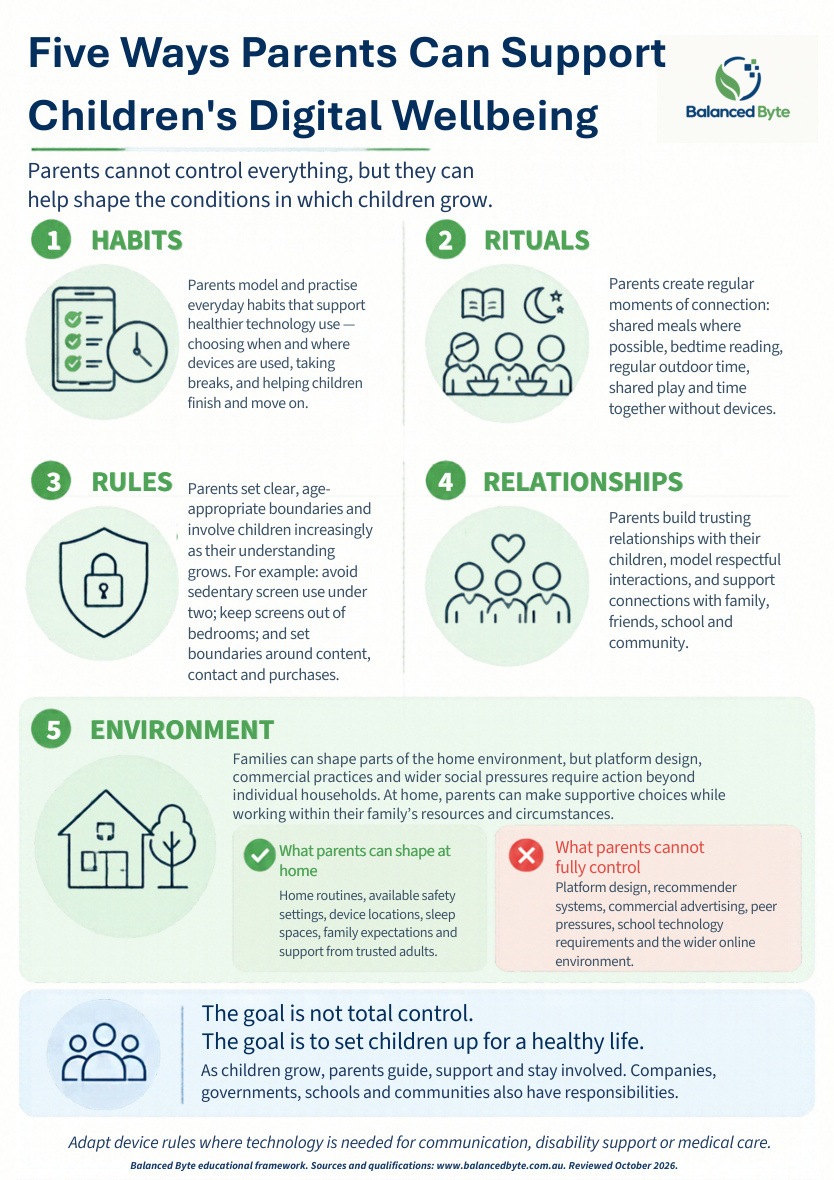
Rules are one part of the picture. Habits, rituals, relationships and the environment help turn your intentions into everyday practice.

Habits

Make helpful actions part of everyday life. Keep devices away during a manageable moment of shared attention; finish with a clear stopping routine.

Rituals

Create reliable moments of connection. Share a meal, read at bedtime or take a regular walk together. Choose rituals that fit your family.

Rules

Set clear boundaries and explain the reasons. Agree where devices are used, which functions are available and where they charge overnight.

Relationships

Keep trust and help within reach. Listen to what your child enjoys, model respectful communication and make it possible to ask for help after a mistake.

Environment

Shape the conditions around your child. Make books, play and movement easy to access. Work with other families and schools on pressures one household cannot solve.

Explore the Balanced Byte rules and practical solutions ↗
Five Ways Parents Can Support Children’s Digital Wellbeing
View PDF guide ↗Download PDF ↓
Give childhood more room

Less digital pressure. More freedom offline.

A boundary needs a positive offer alongside it. Build opportunities for play, friendship, responsibility and growing independence that fit your child’s skills, access needs and surroundings.

  • Practise independence: agree one manageable responsibility or freedom, such as organising a meet-up, helping prepare a meal or travelling a familiar route with an appropriate safety plan. Increase support or freedom as needed.
  • Make room for free play and ordinary boredom: leave some time without a programmed activity. Offer company, materials and places to play without directing every moment.
  • Choose manageable challenges: try a new skill, outdoor activity or task that takes effort. Keep it voluntary and proportionate; children do not need extreme discomfort, deprivation or the removal of essential accommodations.
  • Protect attention and emotional support: allow sleep, quiet, sustained reading and breaks from interruptions. Notice stress and overload. Help children practise emotional skills rather than expecting age or willpower to do the work.

Practical suggestions informed by the books on our reading page and Raising Children Network’s independence guidance. These are not tested treatment claims.

Before you decide / Look beyond the device

Not all tech is created equal.

A screen tells you very little on its own. Look at the activity, who is involved, how the product works, when it is used and what support is available.

A clear purpose and shared support

A Zoom call to Gran on a shared laptop

A planned conversation with a known family member, with an adult helping as needed.

  • Purpose: connection with someone the child knows.
  • Access: a shared device, with the call set up for that purpose.
  • Boundary: a natural ending, with someone available to help.

Support the conversation. Check privacy and who can join.

Private access with fewer stopping points

An iPhone in the bedroom overnight

In this example, feeds, messaging and notifications remain available after bedtime, without a trusted adult alongside.

  • Purpose: several activities can continue without a clear plan.
  • Access: content and contact may reach the child in private.
  • Boundary: notifications and open feeds can make stopping harder and interrupt sleep.

Keep recreational devices outside bedrooms overnight. Preserve essential medical and communication access.

The device is only part of the picture.

The same phone could make a supported family call. The same laptop could open an anonymous chat. Time still matters, alongside purpose, features, access and support. These examples illustrate different arrangements; they are not product safety ratings.

Different activities. Different questions.

Open an example to see what it can offer and what needs checking. A single app can combine several of these activities.

Video callsConnection with people you know

What it can offerA conversation with family or friends can support connection, especially when someone helps a young child take part.

What to checkCheck who is on the call, privacy and recording settings. Keep an adult involved as appropriate and end the call when it no longer meets the need.

Creative toolsMake something, rather than keep scrolling

What it can offerDrawing, music, coding or making a film can give a child a way to practise skills and express ideas.

What to checkCheck ads, purchases, sharing and public galleries. Prefer the functions needed for the project and agree an ending.

Learning toolsA clear learning goal

What it can offerA well chosen activity can support a specific skill or interest. Join in and connect it with learning away from the screen.

What to checkAn “educational” label is not proof of quality. Look at the actual task, distractions, data collection and whether the child is learning.

Programmes and filmsA story with an ending

What it can offerA chosen programme or film can offer enjoyment, storytelling and shared family time.

What to checkCheck age suitability, advertising and autoplay. One selected episode is a different arrangement from leaving recommendations running.

GamesPlay, challenge and collaboration

What it can offerA game can involve puzzles, creativity or playing with friends. Offline play and open multiplayer spaces have different features.

What to checkCheck private chat, unknown players, purchases and reward systems. Agree who can join, what spending is possible and when play ends.

Messaging and group chatsStay in touch and organise plans

What it can offerCommunication with known people can help friendships and practical arrangements.

What to checkGroup pressure, bullying, unwanted contact and constant notifications can still occur. Check invitations, privacy and overnight access.

Social mediaExpression, interests and community

What it can offerYoung people may seek connection, information or a place to share their interests. Those needs deserve attention.

What to checkCheck public reach, contact, feeds, comparison, advertising and data use. Balanced Byte recommends delaying social media accounts until 18; plan other ways to stay connected.

Short videos and anonymous spacesEntertainment and discovery

What it can offerA clip can be enjoyable or useful. A continuous personalised feed creates a different experience from choosing one video.

What to checkLook for endless scrolling, rapid recommendations, harmful content and contact from unknown people. An anonymous account does not establish who someone is or make contact safe.

Start with the need. Then check the actual experience. What will your child do, who can reach them, what keeps them using it and what else needs room?

Use the family decision guide ↓
Sources and how to use these comparisons

Practical examples developed from the Balanced Byte rewards and risks worksheet. Categories are not a validated ranking: benefits and risks vary with the child, the product and its use. Essential communication, medical and accessibility functions require individual consideration.

Examples and links reviewed 30 October 2026. See the reference list and the Balanced Byte family boundaries.

03 / A decision, together

Before the next
“Can I have this?”

Start with your child’s need. Look at the request, the features and what else needs room. Then choose a next step you can explain and keep.

Your family decision guide
  1. Put the request in context.
  2. Check the experience and the alternatives.
  3. Make a plan together.

Seven short questions. Choose what fits your family, then copy or save your plan.

The guide does not submit your answers or save them to an account. You can copy or save a plan yourself.

Read our recommended family boundaries ↗
Look at the experience behind the screen

Check safety, privacy and design

Alongside what technology adds or replaces, ask how this product works, whose interests it serves and what risks its features create.

  • Content and contact: What might your child see, and who can contact them?
  • Privacy and dignity: What information is collected or shared? Could a message or image be difficult to take back?
  • Attention and spending: Does it encourage continued use, purchases or repeated checking?
  • Who benefits? What does your child gain? What do the platform, advertisers or other users gain?
  • Who makes money? Does money come from advertising, subscriptions, purchases or the use of personal data? Does keeping your child engaged help someone earn more?
  • How could someone exploit this platform? Could its contact, messaging, anonymity or payment features be used to manipulate, scam, groom or pressure your child? What safeguards and reporting options are available?
  • Control and responsibility: What can you manage in practice, and what requires action by the school, provider or platform?
Clear boundaries. More room for childhood.

The Balanced Byte rules

We recommend three clear family boundaries to protect space for childhood and reduce exposure to online risks. Children should not have to prove they can withstand exploitation or manipulative design before adults act.

Protection should not stop at the screen.

A child can be at home and still encounter harmful content, unwanted contact or commercial pressures online. Private chats can put those encounters beyond a trusted adult’s view. Being able to use an app does not mean a child can recognise grooming, resist pressure or manage every risk.

Children’s skills and judgement develop with experience and support. Teaching them to ask for help matters; making the environment safer is also the responsibility of the adults and organisations providing it. eSafety: grooming and unwanted contact ↗

Designed to keep them coming back

Some apps use endless scrolling, autoplay, notifications and reward loops to keep people engaged. These features can encourage compulsive use and make stopping harder. We take addictive design seriously. A child’s willpower should not be the whole safety plan. eSafety Commissioner, May 2026 ↗

We put boundaries around adult spaces and addictive products. Digital access needs protection too.

We would not send a young child alone into a crowded adult venue and expect them to manage every encounter. A screen can open a door to people, content and pressures far beyond the room the child is sitting in. The question is what they can reach, who can reach them and what protection is in place.

Restrictions on tobacco illustrate a protective principle: children need more than instructions to resist an addictive product. Some digital products use features that encourage repeated checking and make stopping difficult. Our view is that clear boundaries, safer design and company responsibility should support children before problems develop.

These comparisons concern the principle of protection; the risks are different. A call home, an assistive tool and an endless feed serve different purposes. Meet the child’s need while limiting unnecessary exposure.

No personal smartphone or tablet before 16.

Delay personal ownership. Use shared family devices for purposeful activities, with adult support appropriate to your child’s age.

No social media accounts before 18.

Keep social media accounts out of childhood. Help your child stay connected through friendships, shared activities and agreed ways to communicate.

No recreational devices in bedrooms overnight.

Charge and store devices in a shared space. Make the bedroom a place for sleep and rest, with adults modelling the same habit.

Our approach is precautionary: research does not establish 16 and 18 as universally optimal cut-offs. These are Balanced Byte’s family recommendations. In Australia, age-restricted social media platforms must take reasonable steps to prevent under-16 accounts; this is an obligation on platforms, with no penalties for children or parents. Our recommendation to wait until 18 goes further. Make proportionate arrangements for essential communication, accessibility and medical care without bypassing applicable law or service age requirements. Read eSafety’s explanation ↗

Putting the rules into practice

Explain the boundaries and agree how they will work at home. Give your child a say in the practical arrangements, make the next step clear and model the habits you ask of them.

“My child needs to contact me.”

The problem
They travel independently, move between households or need to reach a trusted adult.
A practical solution
Choose a simpler phone for calls and texts, or another communication option that meets the need. Check whether the device includes a browser, app store or other features you did not intend to provide. Agree who they can contact and how to get help.

“School requires a device.”

The problem
Homework, learning tools or school communication involve technology.
A practical solution
Plan access to a shared family or school device in a common area, with the apps and accounts needed for the task. Ask the school which functions are essential and discuss alternatives where necessary. School access does not have to mean unrestricted personal ownership.

“All their friends are on it.”

The problem
Your child is worried about missing out, losing friendships or being left out of plans.
A practical solution
Take that concern seriously. Help arrange meet-ups, calls or agreed ways to exchange plans. Coordinate with other parents so your child is not carrying the boundary alone. Choose communication tools by their actual features; messaging services can also carry risks.

“They can’t seem to stop.”

The problem
An app keeps pulling them back, or finishing regularly turns into a conflict.
A practical solution
Agree the purpose and stopping point before use, and help them move to the next activity. Turn off non-essential notifications and autoplay where possible; prefer tools with clear endpoints. Keep overnight charging in a shared space. Settings can help, but platform design also needs to change.

“They already have a phone or account.”

The problem
The family is starting from arrangements that do not match these boundaries.
A practical solution
Explain what is changing and why. Make a practical transition plan together: preserve important contacts and school access, arrange other ways to stay connected, and agree dates for changes. Avoid treating past access as the child’s fault or making support depend on perfect behaviour.

“Their access needs are different.”

The problem
Disability, medical care, safety or essential communication requires a different arrangement.
A practical solution
Make a proportionate exception for the specific need. Agree the functions, settings and support required, involving the child and relevant professionals where appropriate. Keep essential access available, and be open about how the arrangement works. Use lawful alternatives that meet the need; an essential-access exception does not waive a service’s age requirements.

Families need backup

Parents can offer connection, boundaries and support. They cannot monitor every interaction or redesign the products children encounter. Schools must plan inclusive access and safeguarding; communities need places to meet and play; companies and governments must provide safer design, effective protections and accountability. A child’s safety cannot depend on perfect vigilance at home.

Sources behind this explanation

eSafety Commissioner: Recommender systems: Position paper (May 2026), especially pages 16–17 on features that may encourage compulsive use.

eSafety Commissioner: Child grooming and unwanted contact, on children’s difficulty recognising grooming and contact beyond carers’ knowledge.

Australian Government Department of Health, Disability and Ageing: Young people and tobacco smoking, on nicotine addiction and tobacco age restrictions. Checked 30 October 2026.

The adult-venue and tobacco comparisons express our case for protective boundaries. They do not establish equivalent risks, equivalent mechanisms of addiction or that every digital product is addictive. The problem-and-solution examples are practical suggestions for applying the Balanced Byte recommendations.

04 / Beyond the household

Parents have a role.
So does everyone else.

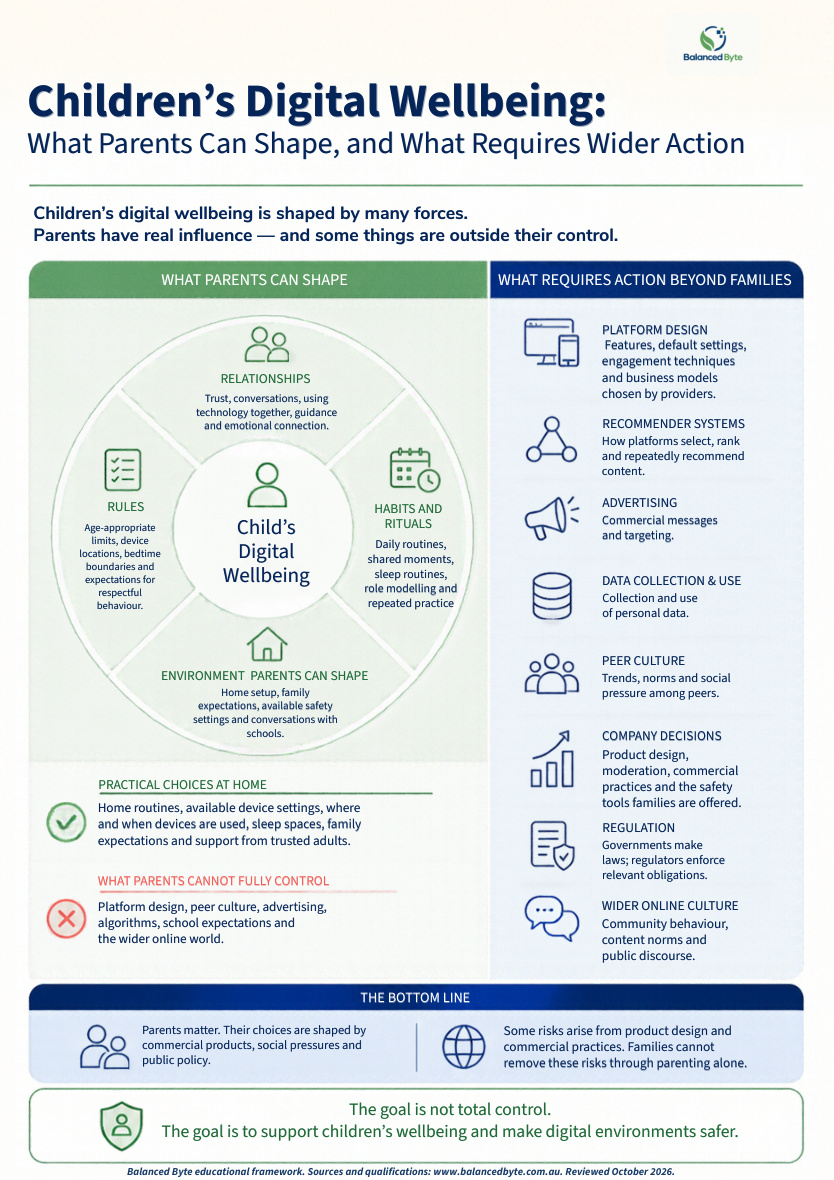
A family can set a boundary. It cannot individually redesign platform incentives, prevent every harmful contact or change school technology requirements. Companies have the most direct control over how their products are designed and operated. Governments can set and enforce rules; schools and communities shape local conditions. Parents remain responsible for guiding use and supporting their children within that wider environment.

Start a shared conversation: What can we change together that one household cannot?

ChildrenA voice in decisions, growing skills and trusted adults to turn to.
FamiliesGuide access and use, build relationships, model habits, seek help and review boundaries.
SchoolsClear requirements, inclusive alternatives and safeguarding pathways.
CompaniesControl product design, recommendations, safety defaults, advertising, data practices and moderation.
GovernmentSet and enforce standards, investigate failures, fund research and hold providers accountable.

This map describes different scopes of control, not measured shares of influence. eSafety’s Safety by Design principles place responsibility on providers to address harms in product design. Families retain a role in guidance, support and collective advocacy.

What Parents Can Shape — and What Requires Wider Action
View PDF guide ↗Download PDF ↓
05 / Research, uncertainty and action

Take the research seriously.
Take childhood seriously too.

The case for protecting children does not depend on proving that technology explains the wider rise in mental-health problems. Harmful content, sexual harassment, grooming-type behaviour and design that makes stopping difficult are concrete concerns. Research helps us understand their extent, who is affected and which protections work.

What the evidence supports

There are reasons to act now.

  • Online hazards are documented. In eSafety’s Australian survey conducted December 2024–February 2025, 24% of respondents aged 10–15 reported online sexual harassment and 14% reported grooming-type behaviour. These are self-reported experiences, not independently established criminal findings. They identify safeguarding concerns without establishing that every child or service faces the same risk. [6]
  • Children need protection as their skills develop. eSafety warns that children may not recognise grooming and that online spaces can enable contact beyond carers’ knowledge. Online knowledge and adult support help, but the responsibility for preventing exploitation belongs with adults and institutions. [7]
  • Protect everyday foundations. Australian guidance emphasises physical activity and sleep, including keeping screens out of bedrooms. [1]
  • Design can make stopping harder. Infinite scroll, autoplay, notifications and reward systems can encourage compulsive use and excessive time online. That is a product-design concern as well as a family challenge. [2]
  • Benefits and risks can coexist. Children report positive online experiences alongside exposure to harm. The product, the activity and the child’s circumstances all matter. Surveys describe experiences; they do not establish cause and effect. [3]
What remains uncertain

The gaps are real too.

  • A single explanation for a complex problem. A 2024 National Academies consensus assessment did not establish that social media causes changes in adolescent health at the population level. It also identified potential harms and benefits, and did not recommend additional access restrictions on the evidence reviewed alone. This uncertainty about population-level causation does not erase documented experiences of abuse, harassment or exploitation. [4]
  • Long-term effects of newer technologies. UNICEF Innocenti has highlighted how little is known about the long-term social, emotional and cognitive effects of children’s interactions with AI chatbots. [5]
  • One perfect rule for every child. Our 16/18 boundaries are precautionary recommendations, not scientifically proven readiness cut-offs. Essential access, inclusion and growing independence still need consideration.

Research should guide action. Protective measures need testing too.

The American Academy of Pediatrics’ January 2026 policy addresses the whole digital environment: children’s needs, relationships, design and commercial incentives, alongside responsibilities across families, institutions, industry and government. That supports looking beyond screen-time totals; it does not validate our exact 16/18 boundaries. Read the AAP policy ↗

We support independent research that follows children over time, examines specific features and includes diverse families and children with disability. Protective measures need evaluation too: do they reduce harm, preserve useful access and avoid unintended exclusion? Better evidence should strengthen or change our recommendations.

How to read this guidance

Official guidelines, research findings and precautionary recommendations answer different questions. We identify sources and dates, consider limitations and competing explanations, and distinguish evidence from our interpretation. The One Plate and decision conversation are educational frameworks, not validated tests of safety or readiness.

Sources for this section

  1. Australian Government Department of Health, Disability and Ageing: Recommendations for children and young people (5–17 years). Updated 13 March 2026. Official guideline.
  2. eSafety Commissioner: Recommender systems: Position paper. May 2026, especially pages 16–17. Regulator analysis.
  3. eSafety Commissioner: Connected, curious, cautious: Children’s engagement in the digital world. Page updated 17 June 2026. Cross-sectional survey.
  4. National Academies of Sciences, Engineering, and Medicine: Social Media and Adolescent Health: Summary. 2024. Consensus study report.
  5. Steven Vosloo and Cecile Aptel, UNICEF Innocenti: Beyond algorithms: Three signals of changing AI-child interaction. 23 May 2025. Expert analysis identifying research gaps.
  6. eSafety Commissioner: Digital use and risk: Online platform engagement among children aged 10 to 15. Page updated 16 June 2026. Cross-sectional survey; 2,629 respondents aged 10–15 from a national sample of 3,454 children aged 10–17. Data collected December 2024–February 2025, before Australia’s social media age restrictions.
  7. eSafety Commissioner: Child grooming and unwanted contact. Parent safeguarding guidance, checked 30 October 2026.

Sources checked 30 October 2026.